Text.app is a simple text editor for Chrome OS and Chrome. It's fast, lets you open multiple files at once, has syntax highlighting, and saves to Google Drive on Chrome OS.File bugs:https://github.com/GoogleChrome/text-app/issuesVersion 0.5.161- Support for opening .eml extension filesVersion 0.5.160- Language support added for: da, de, en-GB, es, es-419, fi, fr, fr-CA, it, ja, ko, nl, no, pl, ru, sv- Dark theme header bar styling changes- Transition animations addedVersion 0.5.157- UI Update Material Design- Add warning for unsaved progress on close using shortcut- Bug fix: translated messages not working- Bug fix: fail to focus already open window on launch- Other minor bug fixesVersion 0.5.96- Bug fix: scroll jumping backVersion 0.5.89- Bug fix and metricsVersion 0.5.87- Fix bug: Save As from app close warning not workingVersion 0.5.83- Warn for unsaved tabs on app close- Fix right click deselects text bug- Fix build errorsVersion 0.5.68- Mimic Sublime default Tab behaviourVersion 0.5.62- Chinese translation by @LarkinZero- Portugese translation by @sergiois- Bug fixes.Version 0.5.39- Bug fixesVersion 0.5.12- Fix syntax highlighting in Monokai.- Add Ctrl-Shift-W shortcut to close window.Version 0.5.7- Shows how many matching search results.- Remove old implementation of autosave feature.- Fix keyboard navigation in confirmation dialog.- Use newer version of CodeMirror library.- Suggest 'txt' extension for the newly created files.- Display 'Loading...' notification when loading a file.- Switch to the previous tab using Ctrl-Shift-Tab.Version 0.4.90- Reopen files on startup.- Suggest the filename for new files.- Show file path when hovering on tab name.- Bug fixes.Version 0.4.53- Switch from Ace to CodeMirror editor component.- Make left panel resizable and remember the state.- Report errors while saving file.- Add an option to translate tabs to spaces.- Underscore the matching bracket.- Add an option to turn on/off smart indentation.- Fixed several bugs.Version 0.4.18- Fixed a saving bug for M-30 canary.Version 0.4.12- Bug fixes and UI tweaksVersion 0.4.1- Rolled a new version of the underlying code editor- No longer matching to *.* file extensions on Chrome OS- Visual tweaks to title bar- Bug fixesVersion 0.3.16- Change font size with Ctrl-+ / Ctrl--- Add an option to switch line numbers on/off.- Change shortcut for opening sidebar from Ctrl-Space to Alt-Space.- Disable autosave until the relevant issue in Chrome is resolved.
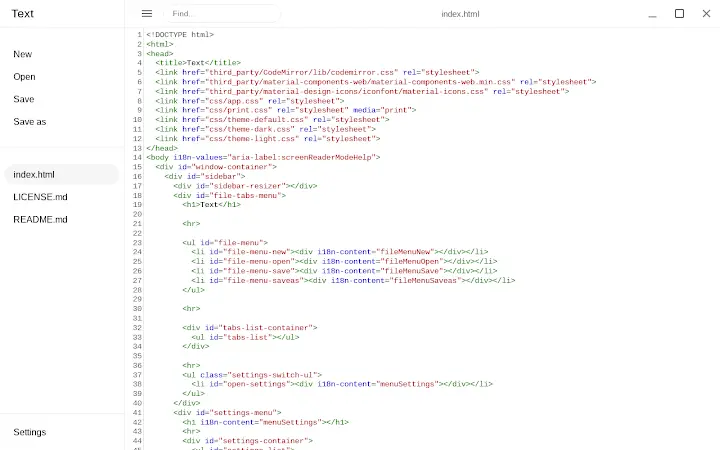
Text App for Chrome
0.0
Téléchargement indisponible
Application du jour

Axcess Network
Détails de l'application
- Version
- 0.8.4
- Taille
- 539.96 KB
- Mis à jour
- November 30, 2023
- Développeur
- text.app
- Catégorie
- Extension
Description
Analysé par TotalVirus
Ce logiciel a été analysé contre les malwares et vérifié comme sûr à télécharger.
Guides et tutoriels pour Text App for Chrome
Comment installer Text App for Chrome
- Cliquez sur le bouton Aperçu / Télécharger ci-dessus.
- Une fois redirigé, acceptez les conditions et cliquez sur Installer.
- Attendez la fin du téléchargement de Text App for Chrome sur votre appareil.
Comment utiliser Text App for Chrome
Ce logiciel est principalement utilisé pour les fonctionnalités décrites ci-dessus. Ouvrez l'application après l'installation pour explorer ses capacités.
Avis des utilisateurs pour Text App for Chrome 0
Aucun avis trouvé
Applications similaires



Application du jour
Axcess Network
Applications recommandées

diados
Extension

diados
Extension

读取 USB 与串行接口设备的数据 App for Chrome
Extension

思维简图 App for Chrome
Extension

Relax.li ☯ App for Chrome
Extension